
Note: You will need:
- A Linux based computer
- A MicroSD Card adapter
Important: The following document was written using a Debian based Linux computer. Different distributions might differ visually from the example shown bellow.
Login as root or sudo
Make sure to login into a terminal using the root user or to switch to it by issuing the following command
sudo su -
Connect your SD card to your Linux computer
Open a terminal and type the following command to identify your SD Card.
fdisk -l
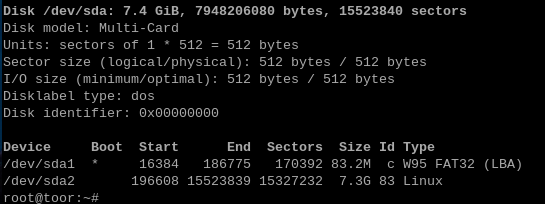
Look for your MicroSD Card or your MicroSD Card adapter. The name of SD card or SD Card adapter will most likely differ from the one in the image above.
Mount the second partition of the MicroSD Card using the following command and replace sdX2 with your SD Card.
mount /dev/sdX2 /mnt
Configure the APN
To configure an APN, type the following command then press "Enter"
nano /mnt/etc/ppp/chatscripts/apn
Using the arrow keys, enter your APN at the last field.
This image is meant to be use as an exemple only
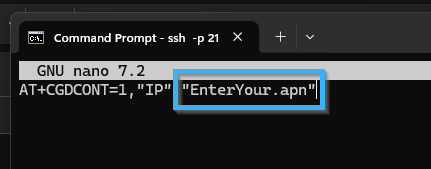
When you are satisfied with your changes, press CTRL and X to exit the text editor. When prompted, type Y to save any changes made to the file or Type N to exit and leave the file as is.
Check the Firmware Version
Type the following command in the terminal and press Enter:
unzip -p /mnt/opt/dcms/dcms-unit.jar release.properties
If the version shown in the terminal is lower than 26_03_02, type the following command in the terminal and press Enter:
curl -o /mnt/home/root/dcms-unit.jar https://files-cac.itesmedia.tv/public/dcms-unit.jar
Wait for the download to complete, then type:
mv /mnt/opt/dcms/dcms-unit.jar /mnt/opt/dcms/dcms-unit.jar.bak
Then:
mv /mnt/home/root/dcms-unit.jar /mnt/opt/dcms/dcms-unit.jar
Installing ITESlive
To download ITESlive, enter the following commands:
curl -o /mnt/home/root/iteslive_node.zip https://files-cac.itesmedia.tv/install/iteslive_node.zip
curl -o /mnt/home/root/iteslive_arm.zip https://files-cac.itesmedia.tv/install/iteslive_node_linux-arm64.zip
curl -L -o /mnt/home/root/iplayer_node.zip https://files-cac.itesmedia.tv/iplayer/main/iplayer_node.zip
Unzip all files:
unzip /mnt/home/root/iteslive_node.zip -d /mnt/home/root/iteslive/
unzip /mnt/home/root/iteslive_arm.zip -d /mnt/home/root/iteslive/
unzip /mnt/home/root/iplayer_node.zip -d /mnt/home/root/iteslive/iplayer
Remove unused files:
rm /mnt/home/root/*.zip
Making sure that ITESlive starts on its own
Enter the following command and press "Enter".
curl -o /mnt/etc/systemd/system/iteslive.service https://files-cac.itesmedia.tv/install/papercast/iteslive.service
ln -s /etc/systemd/system/iteslive.service /mnt/etc/systemd/system/multi-user.target.wants/iteslive.service
Making sure that all permissions are set properly
Run the following command:
chown -R root:root /mnt/home/root/
Unmount the SD Card
Run the following command to safely unmount the SD Card before disconnecting it
umount /mnt/