What is the Fixed Refresh Rate?
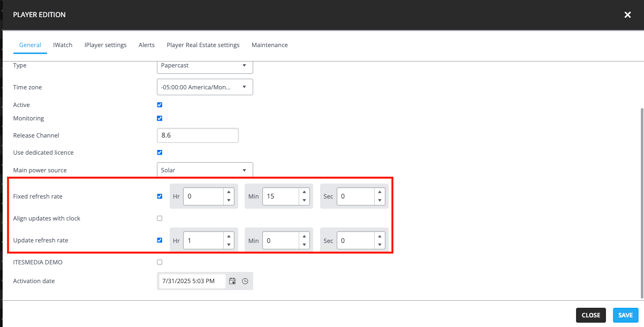
The Fixed Refresh Rate determines the interval, in minutes, between each screen refresh. It corresponds to the minimum amount of time between content updates and is primarily used for updating the display of GTFS data.
Recommended Settings
For Papercast devices, a minimum Fixed Refresh Rate of one minute is recommended to help preserve the lifespan of the display. Longer intervals may also be beneficial for solar-powered devices and are particularly recommended for models operating on long-life batteries without recharging capabilities.
Increasing the Fixed Refresh Rate reduces the device’s energy consumption, helping to extend battery life and ensure reliable long-term operation.
What is the Update Refresh Rate?
The Update Refresh Rate determines the interval, in minutes, at which the device communicates with the server to check for available updates. This includes remote commands, configuration changes, and display layout updates.
Recommended Settings
The recommended Update Refresh Rate during normal operation is 60 minutes. During installation and deployment phases, a shorter interval of 15 minutes is generally recommended to speed up the application of changes and simplify validation.
For solar-powered devices, the interval may be adjusted according to site-specific energy constraints. For battery-powered devices, a longer Update Refresh Rate is recommended to reduce power consumption and maximize battery life.
Increasing the Update Refresh Rate reduces the frequency of server communications, lowering energy consumption. It is important to balance energy efficiency with the speed at which configuration changes need to be applied in the field.
How to modify the Fixed Refresh Rate and Update Refresh Rate
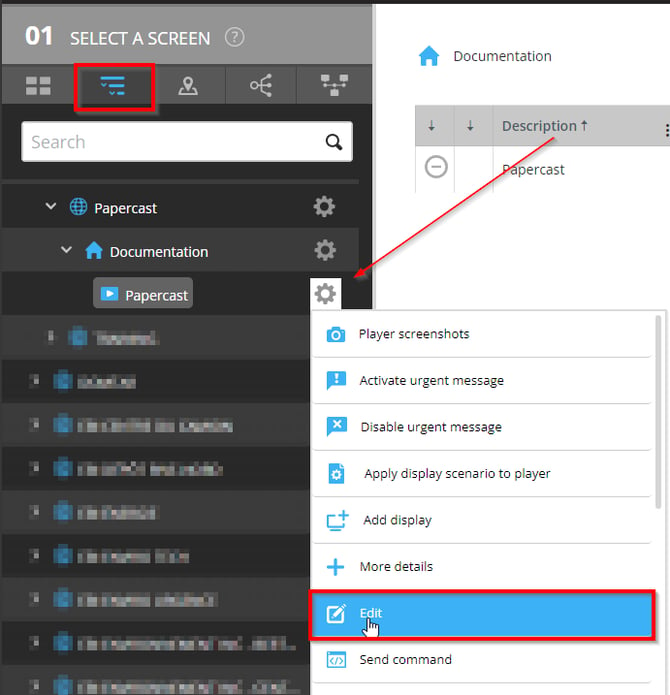
1. Select the desired device and open the modification window.